SPOT Platform Deployment
Deploy SPOT (Spear-Phishing Overwatching Tool) on your server with automatic HTTPS.
Analyzers Required
SPOT requires external analyzer services to perform email analysis. The core platform provides orchestration only - without analyzers, every analysis ends with the verdict unknown, and the analyzer-orchestrator logs lines like:
Analyzer analyzer-nlp in stage parallel-analysis: no URL configured
spot-cli setup installs them. For an install made by hand, see Installing plugins below.
Prerequisites
| Requirement | Version | Check |
|---|---|---|
| Docker Engine | 25.0.4+ | docker version |
| Docker Compose | 2.24+ | docker compose version |
| Git | 2.0+ | git --version |
A public domain pointed at the server is recommended for production (it's what lets Traefik issue real Let's Encrypt certificates), but strictly optional. For an evaluation install you can use spot.local (or any non-public TLD) as the domain, add a matching entry to /etc/hosts, and Traefik will fall back to its built-in self-signed cert — see the local DNS note under Quick Start.
The memory, the disk space free for Docker and the GPU depend on the profile installed (see Profiles).
Quick Start
Create the DNS records first (see DNS Setup), then:
cd /opt
git clone https://codeberg.org/SPOT_Project/spot.git
cd spot
git checkout --detach "$(git describe --tags --abbrev=0)"   # the latest release: main is development
cd deploy
scripts/spot-cli setup
If you still run the deploy repository's checkout, move first
Releases before the move to the spot repository were installed from the deploy repository, in /opt/spot. That checkout has no deploy/ directory: follow the move in Upgrading once, then use the commands below.
scripts/spot-cli is SPOT's command-line tool. Run it from /opt/spot/deploy. Once it is on your PATH (Installing spot-cli), spot-cli runs it from anywhere, as these pages often write it.
setup asks for the profile, showing what each installs and needs (Enter takes minimal), the domain, the e-mail address Let's Encrypt writes to and the first admin's, or takes --profile, --domain, --acme-email and --admin-email. It asks an empty answer again. When it asked anything, it prints the options that give the same answers and asks before it writes .env or starts anything. Then it:
- checks the host: Docker Engine and Compose, git, the memory the profile needs and, on a new install, the disk space, ports 80 and 443, that the domain and
api.<domain>resolve, and the NVIDIA runtime forstandardandfull. It lists every problem with its fix before it stops; - writes
.envfrom.env.example, readable by its owner only, with every secret generated. An existing.envis kept: its secrets protect the data; - pulls and starts SPOT, and waits for every health check;
- signs in as the admin, installs the profile's plugins, creates its workflow and makes it the default, then waits until each plugin is healthy;
- analyzes
samples/test-phishing.eml: it fails unless the verdict is a real one, a class other thanunknownwith every analyzer answering, naming the analyzers that did not answer.
It ends with the time it took, the dashboard's address and the admin user. Its password is SPOT_ADMIN_PASSWORD in .env: setup never prints a secret. Keep a copy of .env apart, and back up with scripts/spot-cli backup (see Backup and restore).
Run again, setup keeps .env and installs only what is missing: a workflow edited since and a default workflow an admin chose are kept. It checks the kept .env against the profile, COMPOSE_PROFILES and the profile's Ollama settings, and lists each line to set before it stops. --domain and the e-mail options are then ignored, with a warning. It signs in with SPOT_ADMIN_USERNAME and SPOT_ADMIN_PASSWORD of .env: once the password is removed from it (see After first start), sign in with scripts/spot-cli auth login and run scripts/spot-cli profile apply <profile> instead. Given every option, it asks nothing. --yes, or no terminal, never asks: a missing option stops it, and the profile is minimal.
Docker Desktop on macOS: share /opt/spot
On Linux servers (the supported deployment target) this Just Works. On macOS — useful for an evaluation install — Docker Desktop only shares the user's home directory by default, so the api-gateway's bind-mount of ./docker-compose.yml (used by the System Updates page to detect compose drift) fails with mounts denied: The path /opt/spot/deploy/docker-compose.yml is not shared from the host. Two fixes:
- Add
/opt/spotto Docker Desktop -> Settings -> Resources -> File Sharing and Apply & Restart, or - Clone the repo under
~/spotinstead of/opt/spot(Docker Desktop already shares$HOME). All other commands in this guide work the same; just substitute the path.
Production deployments belong on Linux; the macOS path is for quick evaluation only.
Local DNS (.local, .test, .localhost) and ACME
For an evaluation install pointed at a non-public domain (e.g. DOMAIN=spot.local resolved via /etc/hosts), Let's Encrypt refuses to issue with urn:ietf:params:acme:error:rejectedIdentifier :: Domain name does not end with a valid public suffix (TLD). Traefik logs the rejection on every router (traefik.${DOMAIN}, api.${DOMAIN}, the dashboard) and falls back to its built-in self-signed certificate, so the stack still serves over HTTPS — just expect a browser cert warning and the ACME error lines in docker compose logs traefik. Both are cosmetic on a non-public TLD; they go away once DOMAIN resolves to a real, publicly reachable name.
Profiles
--profile picks what SPOT runs, minimal by default:
| Profile | Installs | Memory | Disk free for Docker | GPU |
|---|---|---|---|---|
minimal | analyzer-rules and analyzer-nlp | 4 GiB | 20 GiB | none |
standard | plus analyzer-llm with phi4-mini, on the bundled Ollama on the GPU | 12 GiB | 30 GiB | NVIDIA, with its container runtime (The GPU variant) |
full | plus analyzer-llm with llama3.1 8B, on the bundled Ollama on the GPU | 16 GiB | 40 GiB | NVIDIA, with its container runtime (The GPU variant) |
analyzer-llm is of egress class content: it sends the email's content to its LLM server, the bundled Ollama. standard and full ask for an admin's consent before anything starts, or take --consent-content.
The GPU profiles are untested on GPU hardware
standard and full run the GPU variant of the bundled Ollama, which has only passed docker compose config: it has not run on a GPU host yet. Report what you find on one.
standard and full differ by their model and memory only: both need an NVIDIA GPU. On 4 CPUs, phi4-mini did not answer the test email within analyzer-llm's 120 s, so no first verdict could be a real one. On a host without a GPU, setup refuses them before it writes anything, and names minimal.
scripts/spot-cli profile list shows the profiles; profile apply applies one to a running platform installed by hand.
By hand
To install without setup, configure .env yourself:
cd /opt
git clone https://codeberg.org/SPOT_Project/spot.git
cd spot
git checkout --detach "$(git describe --tags --abbrev=0)"   # the latest release: main is development
cd deploy

# Configure domain and secrets
cp .env.example .env
vim .env  # Set all required variables

# Start SPOT
docker compose up -d
Then create the admin user (Create Admin User) and install the analyzers (Installing plugins).
DNS Setup
Before starting, create DNS A and/or AAAA records pointing to your server:
| Record | Example |
|---|---|
DOMAIN | spot.example.com -> 1.2.3.4 |
api.DOMAIN | api.spot.example.com -> 1.2.3.4 |
Traefik will automatically obtain Let's Encrypt certificates.
Using self-signed certificate
If the application is not publicly reachable, Traefik will not be able to generate Let's Encrypt certificate and will fall back to using self-signed certificate.
Verify Installation
# Check services
docker compose ps

# Expected: 12+ services, running or healthy
#   spot-traefik
#   spot-traefik-docker-proxy
#   spot-postgres
#   spot-redis
#   spot-rabbitmq
#   spot-api-gateway
#   spot-plugin-manager
#   spot-plugin-docker-proxy
#   spot-egress-gateway
#   spot-analyzer-orchestrator
#   spot-mail-orchestrator
#   spot-web-dashboard
#   spot-knowledge
#   ...

# Test API (replace with your domain)
curl https://api.spot.example.com/health

# Access Dashboard
# Open https://spot.example.com
Create Admin User
spot-cli setup creates it. For an install made by hand, create an admin user on first start by setting these in .env:
SPOT_BOOTSTRAP_ADMIN=true
SPOT_ADMIN_USERNAME=admin
SPOT_ADMIN_PASSWORD=<16 characters or more, with an upper-case and a lower-case letter and a digit>
SPOT_ADMIN_EMAIL=admin@example.com
If you change this after having created the stack, simply recreate the api-gateway:
Installing plugins
Required for Email Analysis
The SPOT platform is an orchestration layer that coordinates plugins. Without the analyzers its workflows name, no email analysis can be performed: the default workflow runs analyzer-nlp and analyzer-llm. Mail retriever, context provider and responder plugins are optional.
SPOT has four kinds of plugins, all installed the same way:
| Kind | Purpose |
|---|---|
analyzer | Answers each email with a verdict, a score and its signals. |
context_provider | Fills the Knowledge Store with organisational data. |
mail_retriever | Pushes inbound mail into the platform. |
responder | Acts on verdicts (quarantine, notify, ...). |
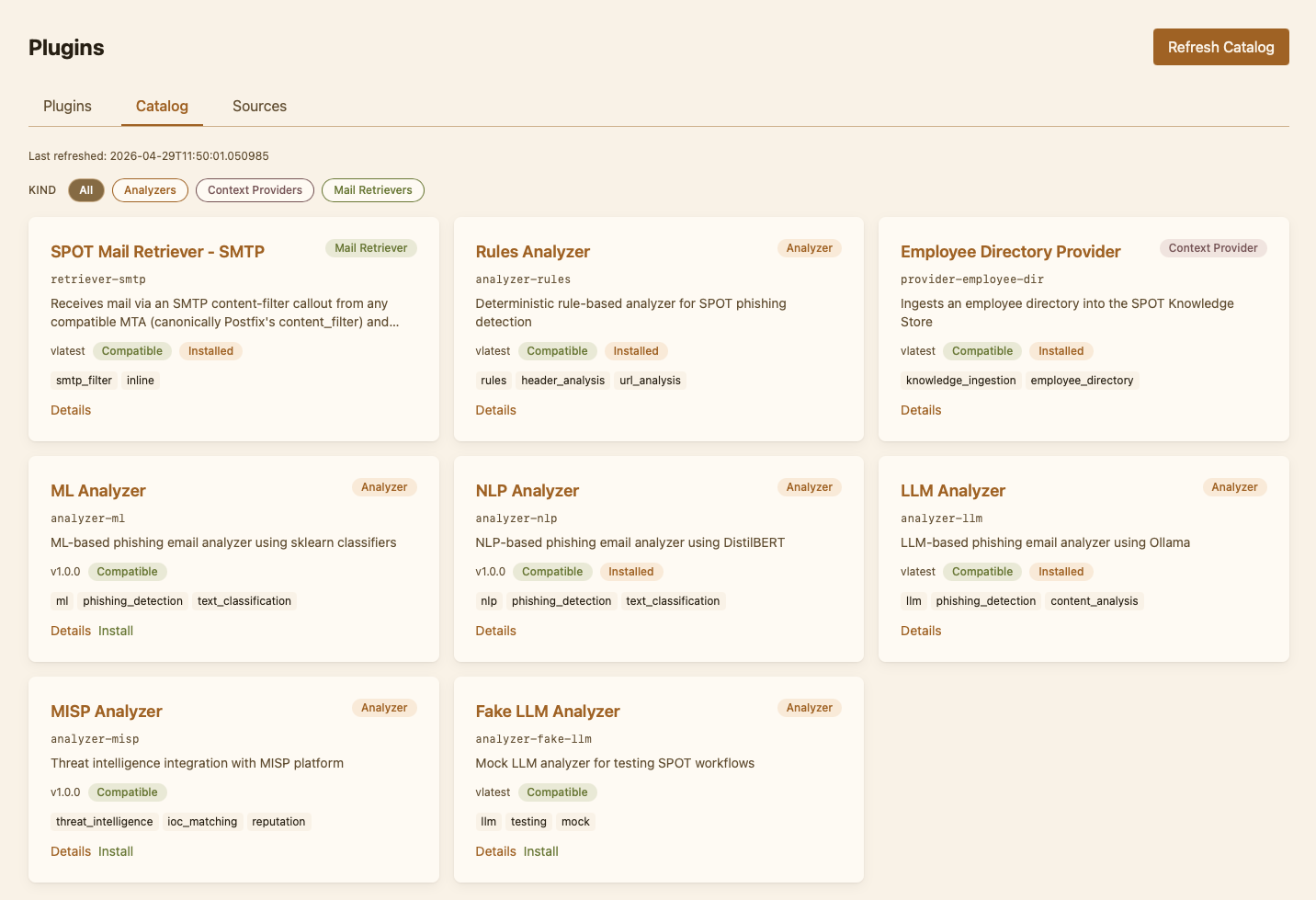
The recommended way to install a plugin is from the dashboard's catalog. The CLI / manual flow is documented further down as a fallback for air-gapped or scripted deployments.
Recommended: install from the dashboard
The official plugins are published on Docker Hub under the spotproject user (mirrored from Codeberg's SPOT_Project organisation), and listed by the signed plugin index, spot-plugin-index, which pins each image by digest. A fresh deployment gets the index as its source automatically on first start ; no manual source registration and no auth required. Its catalog is empty until a first refresh: Refresh catalog on the Plugins pages reads the index, and so does spot-cli setup when a plugin of its profile is not in the catalog.
To install a plugin:
- Sign in to the dashboard as an admin.
- Go to Plugins -> Catalog.
- Pick a plugin (e.g.
analyzer-nlp), open its detail page, click Install. - SPOT pulls the container, registers the plugin in
spot.yaml, applies its default settings, and starts it. The plugin then appears under Plugins -> Installed with a status chip.
Disabling the default source
Set SPOT_BOOTSTRAP_DEFAULT_PLUGIN_SOURCE=false in .env before the first start for an air-gapped deployment or a custom registry: while it is set, no start adds the index, which is otherwise added once (when).
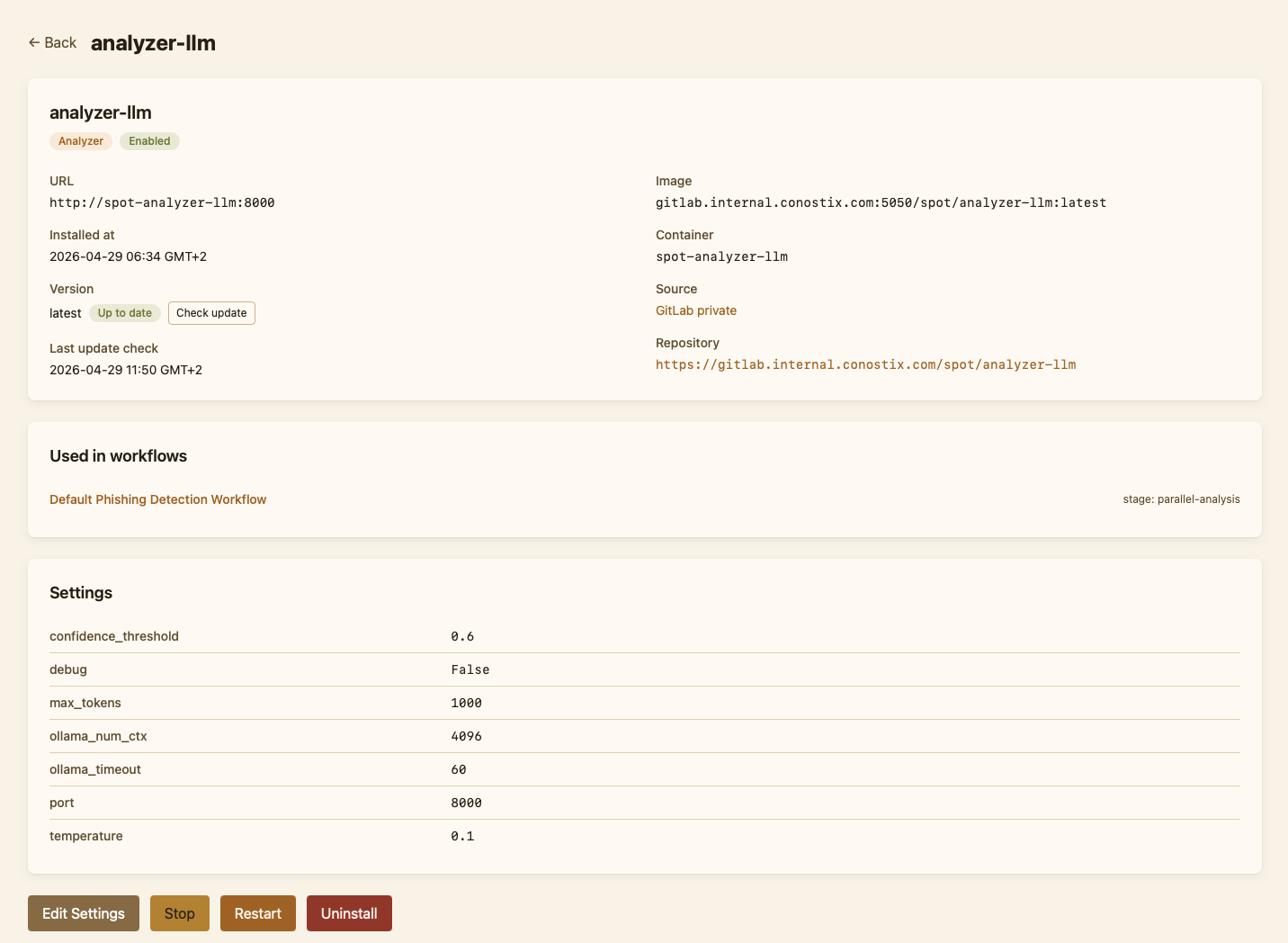
For day-to-day plugin operations (updates, settings, uninstall), see the dashboard's Operator guide.
Official plugins
| Plugin | Kind | Description |
|---|---|---|
analyzer-rules | analyzer | Rule-based contextual analysis. |
analyzer-nlp | analyzer | NLP-based analysis (DistilBERT, NER). |
analyzer-ml | analyzer | Classical machine learning on the email's features: fast, on CPUs. |
analyzer-llm | analyzer | LLM-based analysis via an OpenAI-compatible server, such as Ollama. |
analyzer-misp | analyzer | Looks up the email's indicators in your MISP instance. |
provider-employee-dir | context_provider | Employee directory, from a YAML file or an LDAP directory, into the Knowledge Store. |
retriever-milter | mail_retriever | Postfix milter integration. See Mail integration. |
Manual fallback (not recommended)
Use this only if the dashboard install is not an option
Manual install is for air-gapped deployments, custom registries, or pinning a plugin to a specific image tag outside the catalog. The dashboard flow is preferred because it tracks the install in spot.yaml, applies the plugin's settings schema, and integrates with update / uninstall.
The orchestrator finds plugins through the plugins: tree of spot.yaml, /app/config/spot.yaml in the api-gateway on the spot-config volume. To add a plugin manually, edit that file as in Editing spot.yaml by hand:
Core calls every plugin with the plugin's own token, and an analyzer without one is not called. Issue it, which also adds the manual entry when it is missing:
Then run the analyzer container yourself on the spot-plugins network, the network of the plugins you run yourself, so the orchestrator can reach it, with the token as /run/secrets/spot_plugin_token:
docker run -d --name analyzer-nlp \
  --network spot-plugins \
  --restart unless-stopped \
  -v "$PWD/spot_plugin_token:/run/secrets/spot_plugin_token:ro" \
  spotproject/analyzer-nlp:latest
The token file is a secret: never commit it. Never give a plugin SPOT_INTERNAL_API_KEY. See Plugins you run yourself for the same with a compose file.
The orchestrator re-reads spot.yaml per job, so no restart is needed.
Verify
The dashboard's Health page lists every installed plugin and its current status. From the command line:
For an analyzer that is not called, the orchestrator logs Analyzer <id> in stage <stage>: <reason>. no URL configured means the entry under plugins.analyzers.<id> is missing or its enabled flag is false; no plugin token that the analyzer has no token.
Backups and upgrades
Take a backup with scripts/spot-cli backup, every night and before each upgrade, and put one back with scripts/spot-cli restore, on the same host or a new one: see Backup and restore.
Upgrade with scripts/spot-cli upgrade <version>, which takes a backup first: see Upgrading.
Related Documentation
| Project | Description | Link |
|---|---|---|
| SPOT Core | Platform architecture, CLI, API reference | Platform documentation |
| SPOT SDK | Analyzer development, API contracts, SDK usage | SDK documentation |