How SPOT Works
SPOT is an email-security tool that decides whether each incoming message is a phishing (opportunistic or targeted), or business-email-compromise attempt, and helps the operator act on that decision. This page explains how an email moves through SPOT, what each stage does, and what the operator ultimately sees.
The journey of an email
Every email handled by SPOT goes through the same four stages, regardless of how it arrived or how strict the chosen policy is.
flowchart TB
    Mail([Mail server])
    R[Mail retriever]
    MO[Mail orchestrator]
    AO[Analyzer orchestrator]
    A[Analyzer]
    KB[(Knowledge store)]
    Verdict{{Verdict}}
    Action[Action: tag /<br/>quarantine / allow]
    Dashboard[Dashboard]

    Mail -->|1. new email| R
    R -->|2. ingest| MO
    MO -->|3. analyse| AO
    AO -->|4. workflow| A
    A -.->|5. read context| KB
    A -->|6. result| Verdict
    Verdict -->|7. return| MO
    MO -->|8. apply| Action
    MO -->|9. record| Dashboard

    classDef mail fill:#889b4a,stroke:#5d6f2e,color:#1f1610
    classDef analyzer fill:#e48212,stroke:#a95e09,color:#1f1610
    classDef context fill:#bb7d81,stroke:#8e5b5e,color:#1f1610

    class R,MO mail
    class AO,A,Verdict analyzer
    class KB context
1-2. Ingestion
An email enters SPOT through a mail retriever. A retriever is a small adapter that lives between the mail server and SPOT: it watches for new messages and hands each one to SPOT in a consistent shape, no matter where the message came from. Some retrievers sit inline on the SMTP path (so they can hold or tag a message before it reaches the inbox); others poll a mailbox after delivery. From SPOT's point of view, both styles look the same.
Whichever the source, every retriever pushes the message to the same mail orchestrator, which is the single entry point into the rest of the platform. An operator can run any number of retrievers side by side ; they all converge here.
3-6. Analysis
The mail orchestrator hands the email to the analyzer orchestrator, which runs a workflow ; an ordered set of stages that decides which analyzers should look at the message and how their answers should combine. An analyzer is a single classifier with an opinion: a language-model analyzer reads the prose, a rule-based analyzer flags known patterns, an ML analyzer looks at structural features, a threat-intelligence analyzer compares URLs and senders to known-bad lists. Each analyzer returns its own opinion and confidence score; the analyzer orchestrator combines those into a single platform verdict.
Analyzers that need organisational context fetch it themselves from the knowledge store while they work ; for example, "is this sender in our employee directory?" or "does this domain belong to a known partner?". The knowledge store is filled out-of-band by context providers on their own schedules (see Context, below); no per-email enrichment runs ahead of the workflow.
7-9. Verdict & action
The verdict is one decision per email: a phishing call (yes / no), a threat level (none / low / medium / high / critical), a confidence score, the indicators that drove the decision, and a recommended action (allow, flag, review, quarantine). The analyzer orchestrator hands it back to the mail orchestrator, which is responsible for applying it. When SPOT is running inline, the recommended action is applied straight away ; for example, by tagging the message with a header for downstream filtering or returning a temporary-failure to the sending server. When SPOT is running out-of-band, the verdict simply lands in the dashboard for human review.
Review
Every analysed email and its verdict is recorded so an operator can look at it later. The dashboard is the place where operators spend most of their time: searching emails, opening an analysis to see which analyzers said what, comparing related messages, and adjusting workflows when the policy needs to change.
Context
Context is what lets SPOT tell the difference between a stranger emailing the CFO out of the blue and a finance partner who has been corresponding with the company for months ; and what makes a generic phishing detector aware of the specific organisation it is defending.
It does not run as a step in the journey above. Instead, context providers publish facts about the organisation ; who the executives are, which domains belong to known partners, what the policy book says about wire transfers, and so on ; into a shared knowledge store on their own schedule. Analyzers consult that store directly during analysis, fetching only what's relevant to the email in front of them. Providers and analyzers never talk to each other; they share only the knowledge store and a common tag vocabulary.
What an operator sees
The operator's view of SPOT is the dashboard. There are five places they typically work in:
Analyses ; the live and historical list of every classification SPOT has produced. Each row is one email, with its verdict, threat level, and the workflow that produced it.
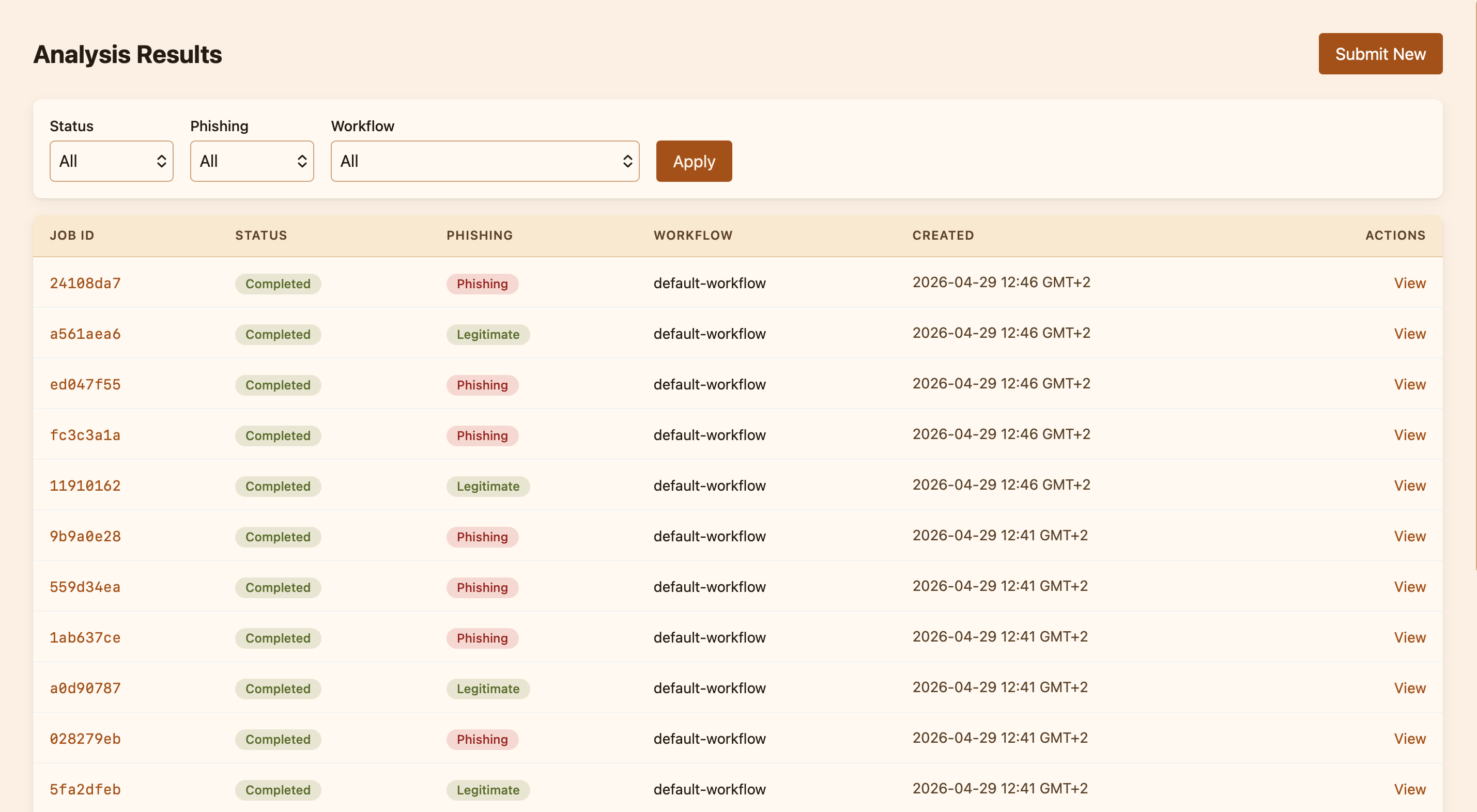
Emails ; the original messages, stored encrypted and viewable on demand. Useful for incident response: "show me everything from this sender in the last week."
Workflows ; the set of policies that decide which analyzers run and how strictly. The dashboard ships with a default workflow and lets operators clone, edit, or replace it.
Plugins ; the catalog of available plugins (analyzers, context providers, mail retrievers) and the list of what is currently installed and running. This is where operators add a new analyzer or register a new context provider.
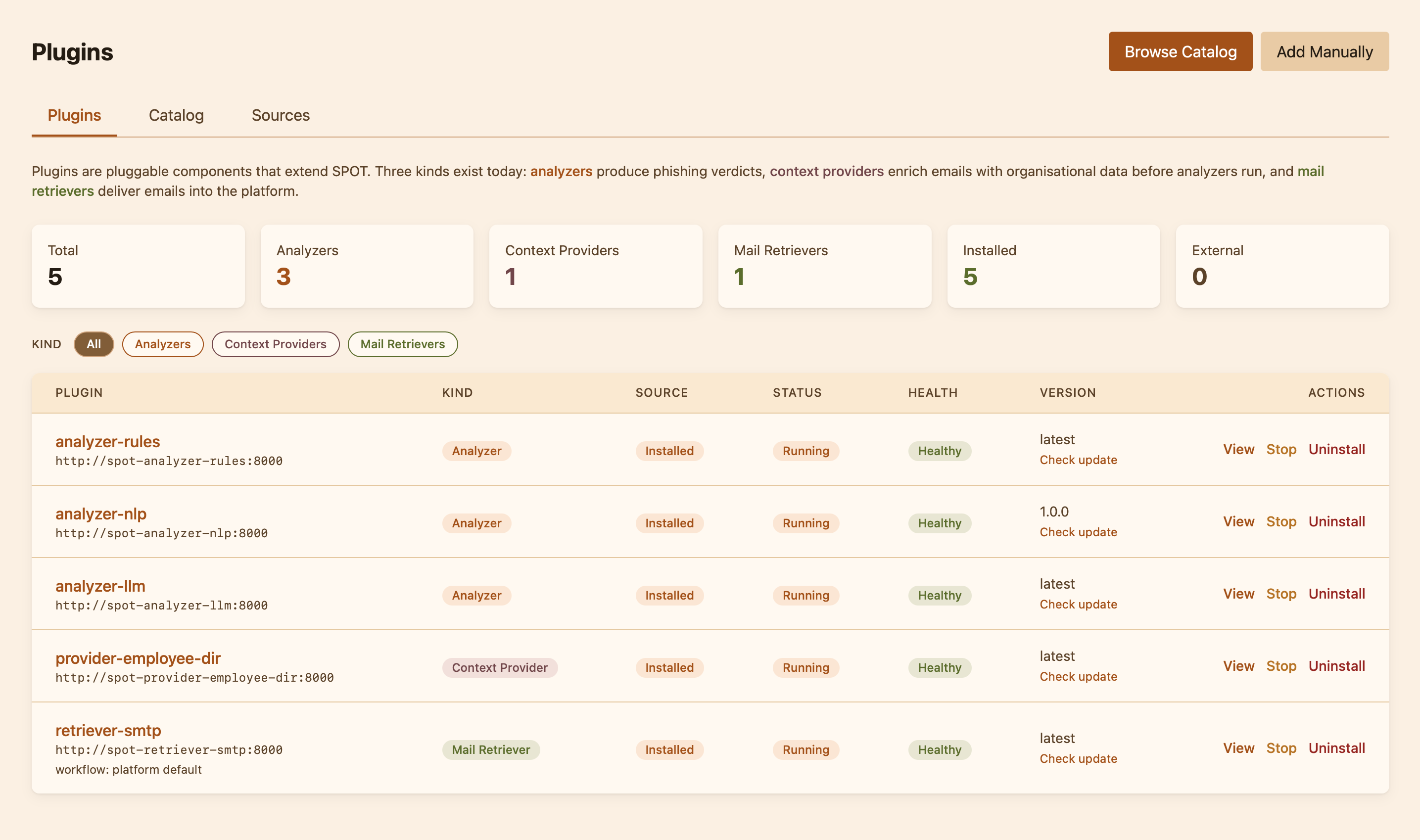
Knowledge ; the consolidated body of organisational facts that context providers have deposited. Operators can browse it, search by tag, or query it the way an analyzer would.
Why the pieces are split this way
SPOT is built around the idea that the questions "where does the email come from?", "what does my organisation know about it?", and "is it a phish?" are independent. A retriever does not need to understand language; an analyzer does not need to know how mail is delivered; a context provider does not need to know what the workflow is going to do with its data. Keeping them separate means the operator can swap any one piece without touching the others ; install a different language model, plug in a new threat-intel feed, switch the mail integration ; and SPOT keeps working.