Knowledge store
The knowledge store is SPOT's shared memory of the organisation it is defending. Context providers deposit organisational facts into it on a schedule; analyzers consult it during analysis to check the email they are looking at against what the company actually knows. The two sides never talk to each other ; they share only the store itself, where every document is embedded as a vector so it can be looked up by meaning and tagged so the search can be scoped to the right slice of the store.
This separation is what lets SPOT improve over time without changing its analyzers. Adding a new context provider ; an HR system, a partner-domain feed, a policy wiki ; instantly makes its data available to every analyzer through the same vector-search-plus-tag- filter contract, with no analyzer changes needed.
What lives in it
A knowledge document is a small, self-contained piece of information that an analyzer can read. Typical examples:
- An employee profile: name, role, department, email aliases.
- A known partner domain and the kind of correspondence expected with it.
- A policy paragraph: the rules around wire transfers, vendor changes, password resets.
- A normalised fact extracted from a wiki, intranet, or HR system.
Every document is processed twice as it lands in the store.
The first and most important step is embedding. An embedding model turns the document into a high-dimensional vector ; a numerical fingerprint of its meaning. Two documents whose vectors sit close together in that space mean similar things, even if they share no words. Vectors are how the store answers the question "find me whatever the analyzer is actually looking for", because similarity is computed on meaning rather than on exact wording.
The second step is tagging. A profile for the CFO might carry the tags employee, executive, finance. A policy entry about wire transfers might carry policy, finance, wire-transfer. Tags are coarse, deliberate, and operator-readable; they exist so an analyzer can narrow a vector search to a slice of the store ("only look in executive+finance documents") rather than against the whole library every time.
Most queries combine the two: a vector to express meaning, and a tag expression like executive+finance to express scope. The search never depends on which provider produced the document ; it depends on what the document means and what it is about.
flowchart LR
    P1[Employee directory<br/>provider]
    P2[Policy wiki<br/>provider]
    P3[Partner-domain<br/>provider]
    KB[(Knowledge store)]
    A1[Language-model<br/>analyzer]
    A2[Rules<br/>analyzer]

    P1 -->|"embed + tag<br/>employee, executive"| KB
    P2 -->|"embed + tag<br/>policy, finance"| KB
    P3 -->|"embed + tag<br/>partner-domain"| KB
    A1 -->|"vector search<br/>+ executive+finance"| KB
    A2 -->|"vector search<br/>+ partner-domain"| KB
    KB -.->|"top-k matches"| A1
    KB -.->|"top-k matches"| A2
How analyzers use it
When an analyzer looks at an email, it asks the knowledge store for documents that are likely to be relevant. The query has two parts:
- The vector part. The analyzer hands over the snippet of the email it cares about ; the body, the subject line, the sender's display name. The store embeds that snippet into the same vector space the documents live in and returns the top-k closest matches by similarity. This is the part that does the real work.
- The tag filter. The analyzer scopes the vector search to a tag expression like
executive+finance. Tags do not replace the vector search ; they shrink the slice of the store the vector search runs against, which makes the result both more relevant and cheaper to compute.
Combining the two is what lets a language-model analyzer notice that a "wire transfer" message is asking for an amount the policy book caps lower, or that the sender's name is almost one of the company's executives. The vector search finds the right document by meaning; the tag filter keeps the search inside the right neighbourhood.
What an operator sees
The dashboard's Knowledge page is a direct window onto the store. Operators can:
- See how many documents each provider has deposited and when it last synced.
- Browse or search the store the same way an analyzer would, using the same tag expressions and the same semantic query.
- Open a single document to see its content, its tags, its source provider, and when it was last updated.
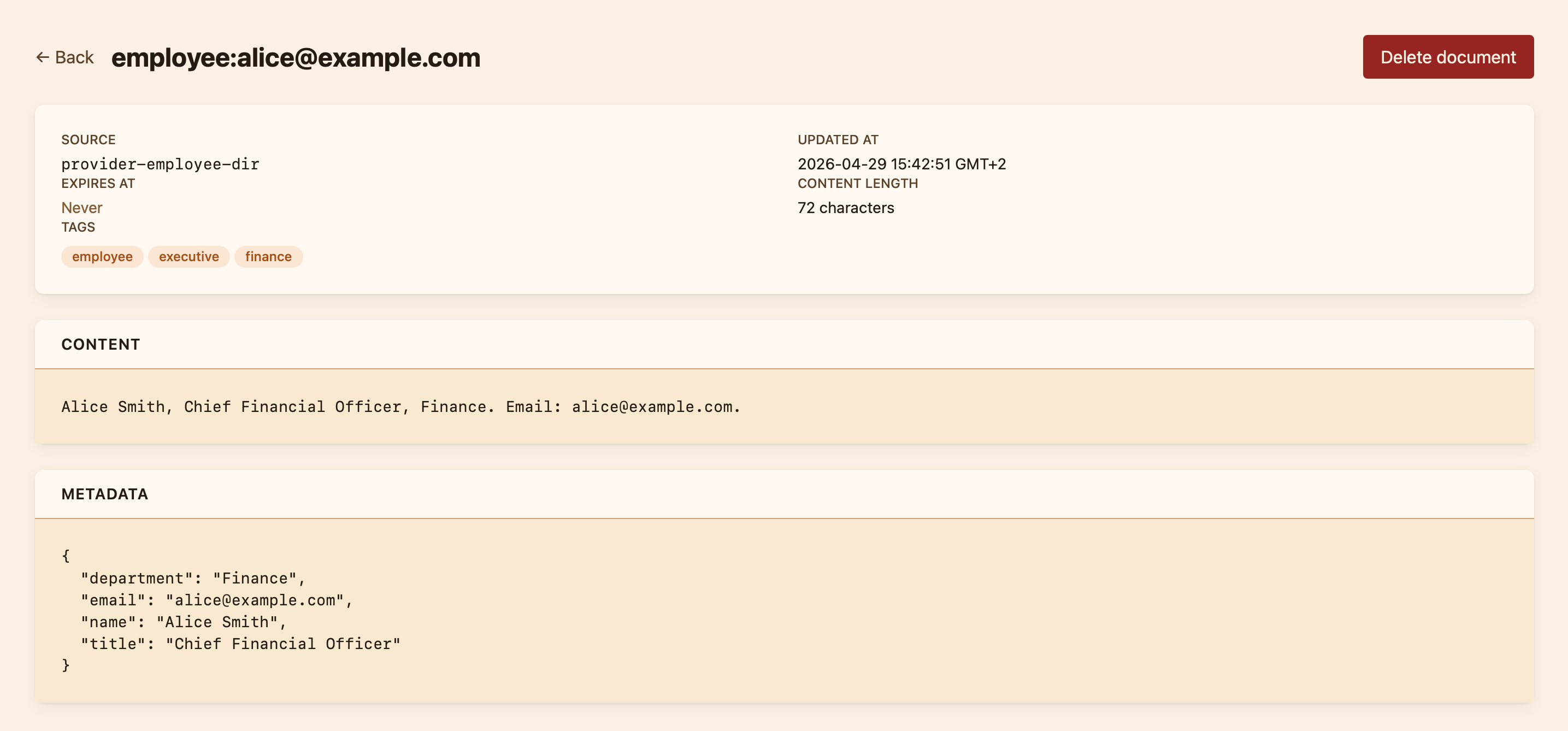
This view exists for two reasons. The first is verification: when an operator installs a new provider, they want to confirm its data arrived in the right shape and with the right tags before any analyzer relies on it. The second is investigation: when a classification looks wrong, the operator can check whether the knowledge the analyzer expected was actually present in the store at the time.
Sync and freshness
Each context provider runs on its own cadence, declared when the provider is installed. An employee directory might sync every six hours; a slow-changing policy wiki might sync once a day. The dashboard shows the last sync time and the next scheduled run for every installed provider, so an operator can tell at a glance whether the data is fresh.
Operators can also trigger a sync on demand from the provider's detail page ; useful right after a personnel change, or when a new partner domain needs to be live before the next scheduled run.
What the knowledge store is not
It is not a search engine for past emails ; that is what the Emails page is for. It is not a verdict cache ; every analysis runs afresh, and the store only holds organisational context. And it is not the place to record human notes on a single message; those belong in the analysis itself, where the audit trail lives.