Workflows
A workflow is the policy that decides how SPOT classifies an email. It names the analyzers that should look at the message, the order they should run in, the rule that turns their answers into the email's verdict, and who acts on that verdict. Every analysis runs under exactly one workflow.
The platform ships with a default workflow: the NLP and LLM analyzers look at the message in parallel, then the LLM analyzer decides in a second stage. spot-cli setup replaces it as the default with its profile's workflow, such as minimal-workflow, which runs the rules and NLP analyzers. Most operators start there and only edit it as their needs evolve.
Every shipped workflow, the three of config/defaults/spot.yaml and the three of spot-cli setup, decides on the attachment.bidi_override signal of analyzer-rules, an attachment name that hides its real extension behind a bidi control: the verdict is suspicious. In the three defaults (default-workflow, nlp-only-workflow, fast-workflow), analyzer-rules only observes, with a weight of 0: that signal counts and nothing else it says does, until real mail shows its false-positive rate. Where the plugin is not installed, the observer is unknown and the workflow decides as it would without it.
What a workflow contains
A workflow is built out of three nested ideas: stages, analyzers, and the verdict policy.
%%{init: {'flowchart': {'subGraphTitleMargin': {'top': 12, 'bottom': 12}}}}%%
flowchart TB
    Email([Email])
    subgraph Stage1[Stage 1 ; fast triage]
        direction LR
        Rules[Rules]
        TI[Threat-intel]
        Headers[Header check]
    end
    subgraph Stage2[Stage 2 ; deep analysis]
        direction LR
        NLP[NLP]
        LLM[LLM]
    end
    Policy{{Verdict policy}}
    Verdict[Workflow verdict]

    Email -->|"1. submit"| Stage1
    Stage1 -->|"2. condition: run<br/>only if suspicious"| Stage2
    Stage2 -->|"3. answers"| Policy
    Policy -->|"4. verdict"| Verdict

    classDef analyzer fill:#e48212,stroke:#a95e09,color:#1f1610
    class Rules,TI,Headers,NLP,LLM,Policy,Verdict analyzer

    style Stage1 fill:#efe9dc,stroke:#a99b78,color:#1f1610
    style Stage2 fill:#efe9dc,stroke:#a99b78,color:#1f1610
A stage is a phase of the analysis. A simple workflow has one stage that runs everything in parallel; a more cautious workflow might use two stages where the first does cheap, fast checks (rules, threat-intel lookups) and the second runs the expensive classifiers only when the cheap ones already found something. A stage can depend on others, so it runs once they finished, and it can carry a condition on an earlier stage's outcome: its score (triage.score >= 50) or its verdict (triage.verdict == suspicious).
Inside a stage, each analyzer has its own knobs: a weight (how much it counts in the score), a timeout, a number of retries, whether it is required, and a failure strategy that says what to do when the analyzer is unreachable or answers nothing usable. The platform applies them automatically; the operator does not have to plumb anything through. An analyzer of weight 0 only observes: it runs, and only its decisive signals count.
How the verdict is decided
Each analyzer answers with a verdict of its own (malicious, suspicious, spam, benign or unknown), a score from 0 to 100 (how likely the email is malicious), how confident it is, and the signals behind its answer: named pieces of evidence such as auth.dmarc_fail or misp.ioc_match.
The verdict policy turns those answers into the email's verdict, in three steps:
- Decisive signals come first. The operator can name signals that settle the matter whatever the scores say: a MISP indicator match makes the email
maliciouseven when every classifier finds it harmless. - The analyzers that count are those of the policy's decision stages (every stage, unless the operator picks some), less those that answered
unknown. If a required analyzer isunknown, or none is left, the email isunknown. - The method decides the rest:
- weighted mean, the default for a new workflow: the scores averaged by weight, against a malicious and a suspicious threshold;
- mean or max: the plain average, or the most alarming score, against the same thresholds;
- most confident: the answer of the analyzer most sure of itself, its verdict and its score;
- majority: the verdict carrying the most weight.
With the three score-based methods, an email below the suspicious threshold is spam when at least half of the weight says so, and benign otherwise. Most confident and majority use no threshold.
A failure is never benign: an analyzer that times out or errors counts as unknown, or fails the job when its failure strategy is fail, and an email nobody could judge is unknown, as is a failed job. The result records what decided (decided_by): a signal, the method, or why the verdict is unknown.
Sender lists
Analysts keep two lists of sender domains in the sender_lists section of spot.yaml, written as a route's sender_domains are (example.com, or *.example.com for its subdomains). They add a domain from an email's label in the dashboard, and each change is a commit of the configuration history by that analyst. A domain is on one list at most.
On every run of every workflow, core adds a signal, attributed to spot, to an email whose sender is listed:
sender_list.blockedwhen the From domain is on the block list;sender_list.allowedwhen the From domain is on the allow list and a trusted DMARC result passed for it. A spoofed From never reaches the allow list, so it needsmail.trusted_authserv_ids, as a route'ssender_domainsdoes; without them an allow list never matches, and the gateway logs a warning when it loadsspot.yaml.
The signals are shown on the analysis and change nothing by themselves: a workflow decides the verdict from them only when its policy names them as decisive, which is the first step of the verdict policy:
A workflow without such a rule gives the verdict it gave before the lists existed. Only core's lists give these two signals: a signal of an analyzer that carries one of the names is never decisive, and the plugin ids api and spot are reserved. The gateway refuses a spot.yaml whose sender lists are invalid; the orchestrator loads it with empty lists and a warning that names the rule and its position, never the domain.
Acting on the verdict
A workflow can name responders, by verdict: quarantine malicious mail, open a ticket for suspicious mail, notify someone when the verdict is unknown. Whether they act is not the workflow's to say: each job enforces the verdict or only observes it, recording what would have been done.
A job is in enforce only when its mail connection and its route both are. A mail connection (a mail retriever) starts in observe, so a new one can be watched before it acts; a route follows its connection, or keeps its jobs in observe. The mode travels with the job: responders are still called in observe, and record what they would have done; the retriever keeps the message as it is. SPOT records every action, applied or not, so an operator sees what enforce would do before switching the connection to it.
A user's submission comes through no connection, and is always in observe. A re-analysis of a stored email takes the mode of the connection the email came through, and its route's when it names no workflow. One that names a workflow is not routed: it takes the connection's mode alone, so a route kept in observe does not hold it.
Why have more than one workflow
A single workflow is enough to start. Operators add more when different sources of mail need different treatment:
- A fast workflow for high-volume sources where latency matters more than depth (e.g. a notifications mailbox).
- A strict workflow for sources where false negatives are very costly (e.g. a finance team): lower thresholds, more required analyzers.
- A triage workflow for spam traps, where SPOT only needs to bucket the message rather than reach a confident verdict.
Routes choose the workflow each email runs, so a message is always evaluated under the right policy without anyone picking one each time. A route matches on where the email came from (a retriever, or api for the submissions), on whom it is for (a recipient group, such as the finance team's addresses), or on the domain it comes from, when our own MTAs say DMARC passed for it. The first route that matches chooses the workflow; an email no route takes runs the platform's default workflow. A route can also cap how long a retriever that waits for the verdict waits, so the milter's mail can run a fast workflow within a short time limit. A workflow an analyst names for a submission is not routed.
Routes replace the workflow a retriever named up to 2.0.0-beta.7: at each start, a retriever's own workflow becomes a route of its own. The Configuration reference gives the rules.
Trying a workflow in the shadow
A new workflow can be watched on real mail before it decides anything: put it in the shadow, for the emails a match picks. Each of their results is run again through the shadow workflow, on the stored email, after production has decided; where the shadow workflow's verdict class differs from production's, SPOT keeps the difference, and GET /api/v1/workflows/{workflow_id}/shadow lists them, newest first. The dashboard's Playground shows each shadow workflow's differences, each linking to production's analysis and the email. Production's verdict, its responders and the retriever's answer never change.
SPOT also counts, per day, the production results each shadow workflow ran on and those on which it differed, the agreeing ones included, and gives the rate of the differences over the last 30 days (the API takes days, 1 to 90): the window is the last 30 UTC dates, today's included. A candidate that differs on 3 % of the mail it ran on is a different thing from one that differs on 40 %. Each result counts: an email analysed again, by a user among others, is run and counted again. The count is at least once: a result delivered again can count twice, so the rate is a measure, not an audit. A run that fails is not counted.
The shadow is not free. Each shadow workflow adds one run per email it picks, and its analyzer calls compete with production's: shadow the mail whose volume the analyzers can carry twice. The shadow runs one email at a time per orchestrator and keeps at most 1 000 results waiting: when it cannot keep up, its oldest work is dropped, never production's. A shadow run comes after its email's verdict, so it never delays it, a waiting retriever's included; but on a saturated analyzer, its calls slow other emails' analyses down, the next waiting ingests among them.
Designing and editing
Workflows are first-class objects in the dashboard. The Workflows page lists every workflow defined for this deployment, marks the one that is currently the platform default, and lets the operator clone, edit, validate, or delete any of them. The editor is form-driven: the operator picks analyzers from the installed set, drags them into stages, and tweaks the per-analyzer settings without writing configuration by hand.
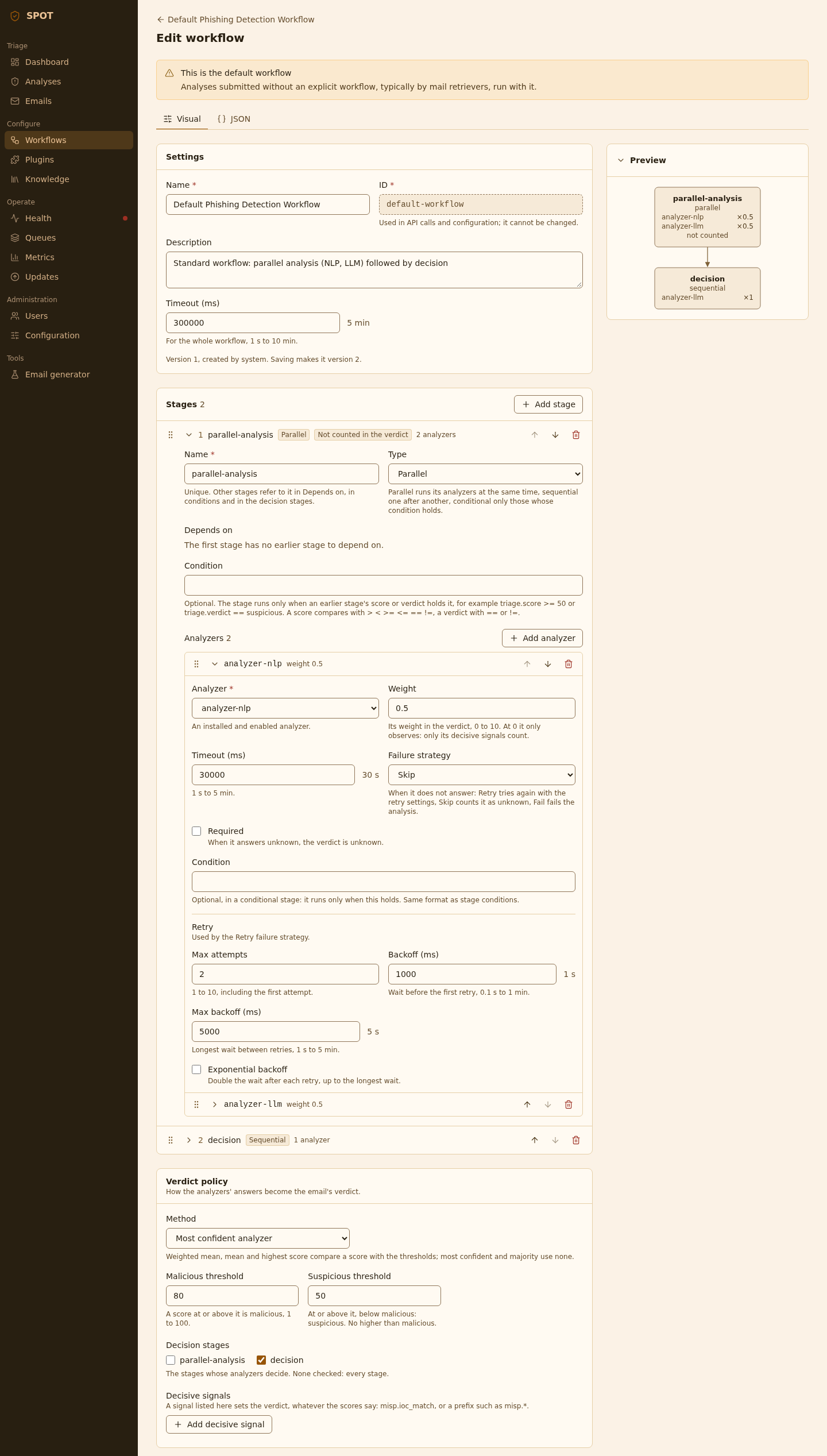
Validation runs on every save: SPOT refuses a workflow whose values are out of range, whose condition does not parse or names a stage it does not have, or whose decision stages hold no analyzer that counts. The save fails with a clear explanation rather than letting a broken policy go live. A workflow whose analyzers are not installed or not healthy saves, and the readiness view shows it as degraded or broken.
Each save is a change of spot.yaml, kept in its history with the user who made it. An admin reads what each change did and rolls the configuration back to an earlier one: the workflows, the default workflow and the other settings return as they were, the plugins stay as they are (History of spot.yaml).
SPOT numbers each workflow's versions: every save stores one past the highest it ever had, whatever the editor sends, so a number names one version. A hand edit of spot.yaml that changes a workflow should raise its version past that highest (spot-cli workflow history <id>): otherwise the number names two versions. A workflow's history lists its versions, newest first, with who saved each and when, and shows what each changed. An admin restores an old version as the next one, a deleted workflow included, and clones a workflow under a new id to try a change without touching the original (API).
The Configuration reference lists every field.
Knowledge-store policy inside a stage
A stage can also declare retrieval limits that apply to every analyzer running in it: a cap on the number of knowledge documents each analyzer is allowed to pull, and a minimum similarity score below which documents are dropped. Limits are caps only; they shrink what an analyzer asks for, never expand it. They exist so an operator can keep a stage cheap or quiet without having to retrain the analyzer.
Testing a workflow
Every workflow can be tested against a sample email straight from the dashboard, by analysts and admins. The test runs the full pipeline against the email, shows the verdict, and breaks down each analyzer's contribution. This is how operators sanity-check a new policy before promoting it to default, and how they reproduce a problematic classification after the fact.
The dashboard's Playground runs this dry run on a stored email, or on a message you upload, and shows a stored email's result beside production's latest verdict and the email's label.
A test stores the message, encrypted, for the length of the run, and deletes it when the run ends: analyzers fetch its raw copy and its parts as during an analysis. No email list, source filter or statistic shows it, and nothing else is stored: no job, no analysis.
A test waits for the workflow's timeout at most. A browser may give up sooner (Firefox waits 300 s for an answer), so test a workflow whose timeout exceeds 5 minutes from curl or a script.
Backtesting a workflow
A dry run answers for one email. A backtest measures a workflow on many, before it decides anything: the platform runs it on emails whose truth is known or whose production verdict is, and stores the run as a benchmark run.
What it takes. Either the stored mail received in a period (the last 1, 7, 30 or 90 days in the dashboard; since and until in the API), narrowed to some sources or to the emails an analyst labelled, the most recent first, or a dataset of promoted copies. Of the stored mail, only received emails with a stored view count (one stored before 2.0 has none), never a dry run's message or a dataset's copy. It takes 500 emails unless told otherwise, and 10 000 at most: past that the start is refused with 422. The run records the end of its period, the start when none is given, so that its emails can be drawn again.
What it compares with. On a stored email, production's verdict: the email's latest completed analysis, whichever workflow ran it, an analyst's analysis of it again included. Analysing an email again with the workflow measured makes that workflow's verdict production's there. Where the workflow's verdict class differs, the result links to that analysis. The truth of an email is its label. The run's metrics (recall, precision, false-positive rate, per analyzer) are counted over the labelled emails, as spot-cli benchmark report counts them, and so are production's beside them, from its verdicts on the same labelled emails: one run says whether the workflow does better than production on them. An email without a completed analysis counts as failed for production, and an email without a label only shows where the workflow differs from production. A dataset's copies carry their labels and have no production verdict, so a dataset's run has no production metrics: backtest the current workflow on the dataset too, and compare the two runs.
What it never does. It stores no job and no analysis, calls no responder, publishes no result, and so feeds neither the shadow nor the analysis statistics. It stores the run's results: a verdict, a score and the times of each email and analyzer, never an email's content.
Its load. One email at a time, on a queue of its own (orchestrator.benchmark) apart from production's, so a backtest never holds up an analysis in the queue. But its analyzer calls run beside production's and compete for the same analyzers, as a shadow's do: start a large backtest when they have room. One platform run runs at a time: a start while one runs is refused with 409, naming it. A cancel is final (a second one is 409) and counts the metrics over what was recorded; the emails still queued are skipped. An email that fails on every delivery ends as an error result, so its run ends. But when the database cannot be reached past the redelivery window (about 13.5 minutes), nothing can record that end: the message is parked and the run stays running, and while it runs no other backtest starts (409). Cancel the run, or replay its parked messages once the database answers (Messages in a dead-letter queue). A workflow deleted during a run fails it, and a workflow saved during a run is run as saved, so the run can mix versions.
Run a backtest from the Playground, or with POST /api/v1/benchmarks (API). A backtest needs the message broker and the analyzer-orchestrator; the run spot-cli benchmark run makes does not need the broker.